


苹果 IOS 版本下载
(不支持中国大陆 Apple ID 下载)
海外苹果ID注册教程 >*
若无法安装或任何原因需要卸载原版本,请先备份好助记词,并使用验证助记词功能验证无误后,再重新安装新版本。
苹果手机使用 海外 ID 下载比特派教程
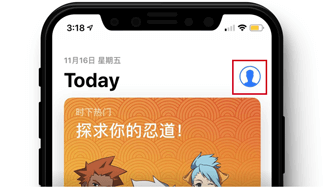
1、打开 App Store,点击右上角 个人中心
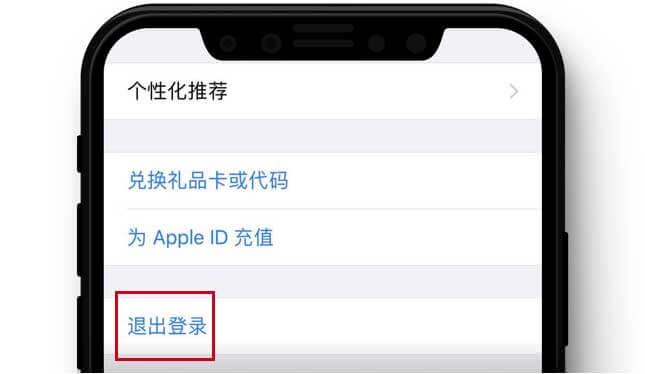
2、点击个人中心下方 退出登录
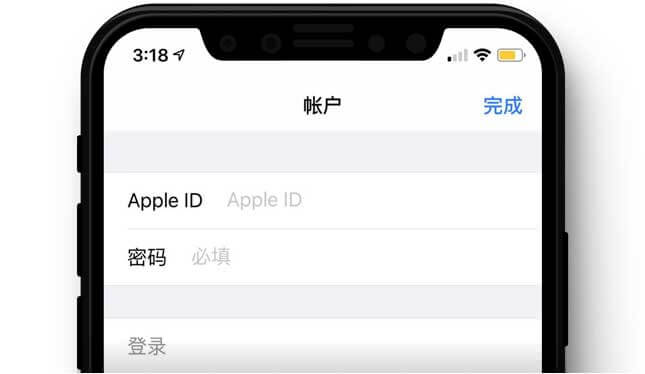
3、登录 海外ID
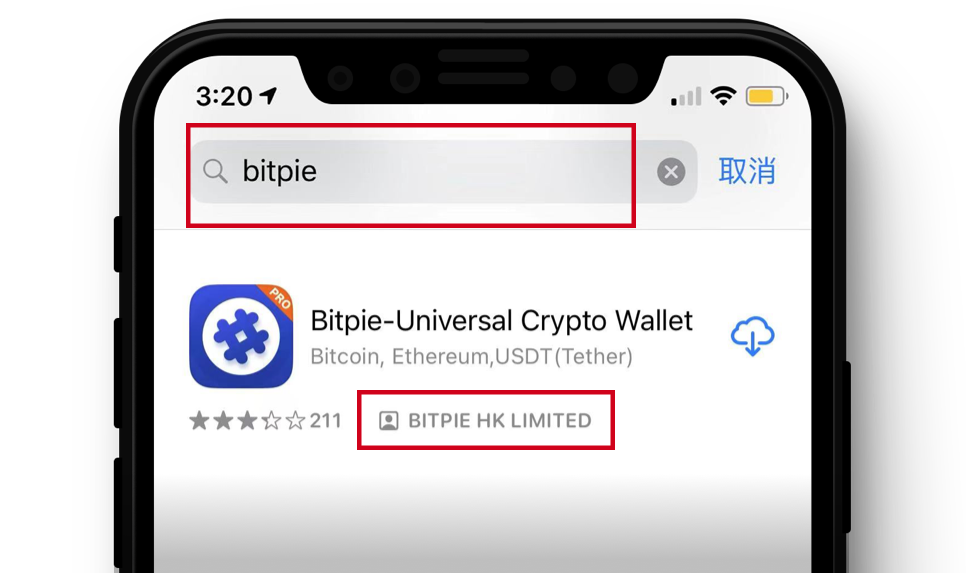
搜索"bitpie"并寻找由 BITPIE HK LIMITED 开发的版本



苹果 IOS 版本下载
(不支持中国大陆 Apple ID 下载)
海外苹果ID注册教程 >*
若无法安装或任何原因需要卸载原版本,请先备份好助记词,并使用验证助记词功能验证无误后,再重新安装新版本。
苹果手机使用 海外 ID 下载比特派教程
1、打开 App Store,点击右上角 个人中心
2、点击个人中心下方 退出登录
3、登录 海外ID
搜索"bitpie"并寻找由 BITPIE HK LIMITED 开发的版本


Apple IOS version download
Not available for download with China Mainland Apple ID
Overseas Apple account Registration Tutorial >*
If the original version cannot install or needs to uninstall for any reason, please back up the mnemonic first, and use the verification of mnemonic function to verify that it is correct before reinstalling the new version.
Tutorial of Apple overseas account to download Bitpie
1、Open App Store,click Account in the upper right corner
2、Click Sign Out at the bottom of the Account
3、Login Overseas ID
Search for "bitpie" and look for versions developed by BITPIE HK LIMITED
苹果 IOS 版本下载
(不支持中国大陆 Apple ID 下载)
海外苹果ID注册教程 >*
若无法安装或任何原因需要卸载原版本,请先备份好助记词,并使用验证助记词功能验证无误后,再重新安装新版本。
苹果手机使用 海外 ID 下载比特派教程
1、打开 App Store,点击右上角 个人中心
2、点击个人中心下方 退出登录
3、登录 海外ID
搜索"bitpie"并寻找由 BITPIE HK LIMITED 开发的版本
Apple IOS version download
Not available for download with China Mainland Apple ID
Overseas Apple account Registration Tutorial >*
If the original version cannot install or needs to uninstall for any reason, please back up the mnemonic first, and use the verification of mnemonic function to verify that it is correct before reinstalling the new version.
Tutorial of Apple overseas account to download Bitpie
1、Open App Store,click Account in the upper right corner
2、Click Sign Out at the bottom of the Account
3、Login Overseas ID
Search for "bitpie" and look for versions developed by BITPIE HK LIMITED
Company
About us下载前须知
请勾选下载须知
Before Downloading
Please check all items above
比特派从 2021年9月13日 起不再支持 iOS TestFlight 版本的 Bitpie 应用,使用最新版 Bitpie 请下载 App Store 版(需使用美国或香港等地区苹果ID),所有的测试版 APP 均为诈骗 APP,请勿下载使用。详情请见官方公告,
通过谷歌商店搜索到的比特派均为假冒APP
请使用手机浏览器访问:bitepai.com
下载安卓版本比特派
Starting from September 13, 2021, Bitpie will no longer support the iOS TestFlight version of the Bitpie application. To use the latest version of Bitpie, please download the App Store version (requires a US or Hong Kong Apple ID). All test versions of the app are fraudulent apps, so please do not download or use them. For more details, please refer to the official announcement at
Through search engines and Google Store searches for
Bitpie are all fake apps
Please use your phone browser to visit:
bitpie.com
to download the Android version of Bitpie